Senior SEO / GEO Specialist


Most SME owners treat website images as a one-time upload task. In 2026, that mindset costs you. Search engines and AI systems now judge your site the moment it loads, and a 5 MB smartphone photo used as a hero banner can push your Largest Contentful Paint (LCP) well past Google’s threshold. Optimising images is now a core part of Core Web Vitals performance and Answer Engine Optimisation (AEO), and it directly affects whether your business shows up in Kerala’s local search results and in AI-generated answers.
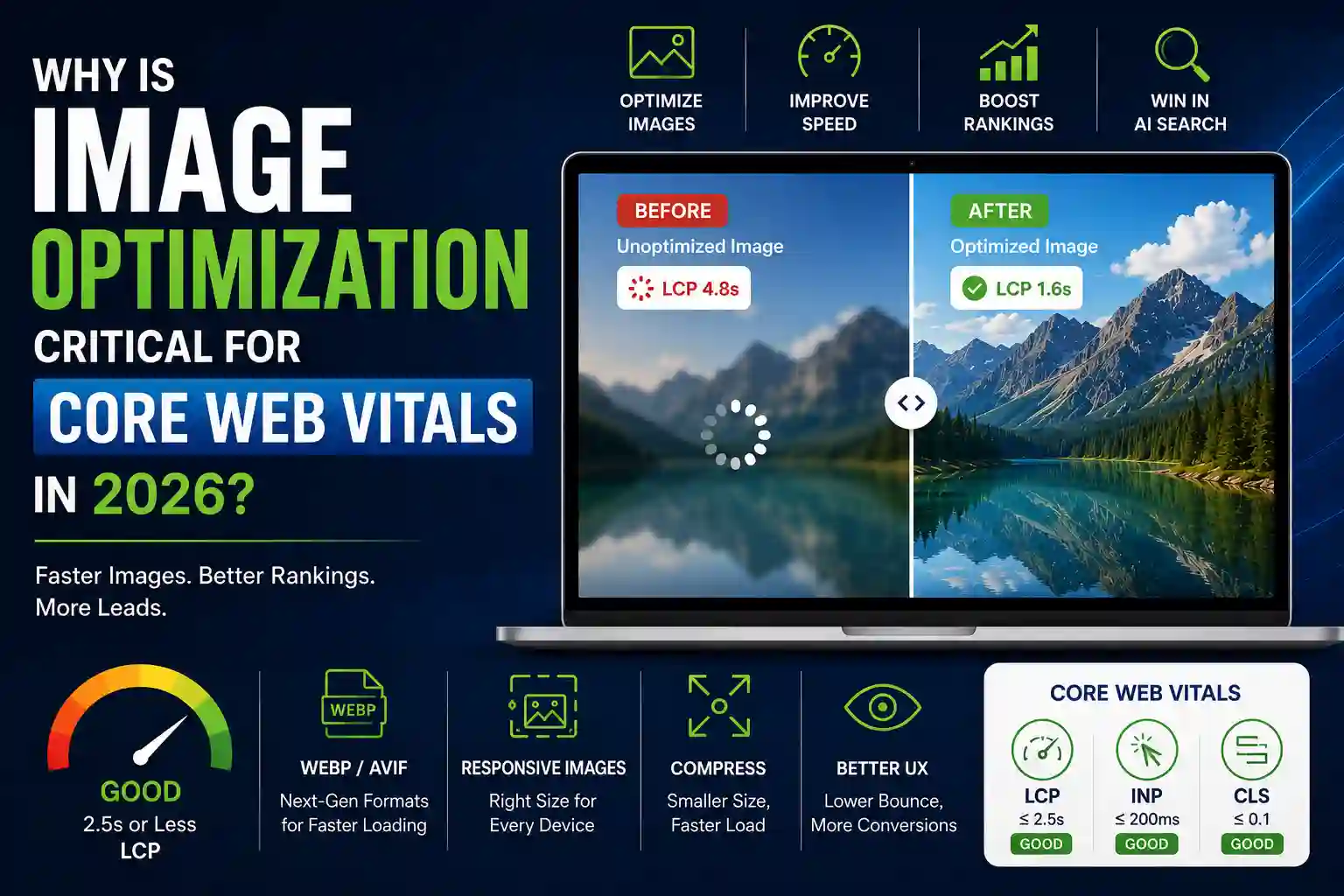
Core Web Vitals are Google’s set of real-world speed, responsiveness, and visual stability metrics. The most critical one for images is Largest Contentful Paint (LCP) — the time it takes for the main image on your page to appear. When your hero image is a 5 MB smartphone photo, LCP shoots past 2.5 seconds, hurting your ranking and driving visitors away.
Image optimization means converting to modern formats (WebP or AVIF), resizing images to the exact dimensions needed, and compressing them to around 70% quality so they load instantly on any device — from Jio Fiber to 4G mobile data in rural Kerala. It’s no longer just a design concern — it’s a lead-generation lever.
In plain terms: If your hero image is too large, visitors on mobile data may leave before your page even finishes loading — regardless of how good your offer is.
of web pages use an image as their Largest Contentful Paint element — fixing that one image is the fastest way to move your Core Web Vitals score from “Poor” to “Good.”
“Image optimization is the single highest-impact, lowest-effort fix you can make for Core Web Vitals in 2026.”
Many business owners upload high-resolution photos straight from their phone camera, sometimes 3–5 MB per image, without ever resizing them.
JPEG and PNG are bulky. WebP and AVIF can shrink file size by 50–80% with no visible quality loss.
Serving a 1920-pixel-wide image to a mobile visitor wastes bandwidth and time on already-limited connections.
Images below the fold that load immediately compete for bandwidth with your hero image, delaying LCP.
Default WordPress or Shopify themes often load large images by default, with performance as an afterthought.
LCP threshold (Good)
Under 2.5 seconds (Google)
LCP threshold (Poor)
Over 4.0 seconds
Images as LCP element
Over 70% of pages (HTTP Archive data)
Recommended image format
WebP or AVIF
Compression level
~70% quality to balance size and clarity
Recommended audit frequency
Every time a new hero or product image is uploaded
Watch our full breakdown of image optimization for Core Web Vitals — including live before/after examples from a Kochi-based client. Subscribe on YouTube →
“A well-optimised image loads only what’s needed, at the size it’s needed — nothing more.”
Go to Google Search Console > Core Web Vitals report. Check the “Poor” and “Needs Improvement” pages. Note which ones have LCP issues, and run your homepage through PageSpeed Insights for a detailed breakdown.
PageSpeed Insights will tell you exactly which image is the Largest Contentful Paint element. Often it’s the hero banner. Right-click that image and check its actual file size — anything above 200 KB is too large.
Use a free tool like Squoosh.app or ShortPixel to convert the image to WebP or AVIF at 70% quality. Aim for hero images under 100 KB and thumbnails under 30 KB. For WordPress, plugins like WebP Express or Imagify automate this.
Add srcset and sizes attributes to your <img> tag so mobile devices load a smaller version and desktops load a larger one. This one change can reduce LCP by over 1 second on mobile.
Add loading=”lazy” to all images that are not immediately visible on the initial screen, so they stop competing for bandwidth with your hero image.
Hand over one instruction: ensure all images are WebP, keep hero images under 100 KB, use srcset for responsiveness, and add loading=lazy to non-critical images.
Outcome: A lean, fast-loading image setup that balances visual quality with Core Web Vitals performance.
A slow site frustrates visitors on mobile data (still common in many parts of Kerala) and overseas NRI visitors expecting instant access. They leave before filling any form.
Google Ads landing pages with poor Core Web Vitals get lower Quality Scores, driving up cost-per-click.
Google’s AI search features tend to prioritise fast-loading, authoritative pages. If your site is slow, you risk being excluded from these high-visibility results.
Rival businesses — including larger chains and modern startups — are already optimising. You’re handing them the lead.
Every extra second of load time pushes more visitors back to the search results, straight to a competitor.
more organic leads — that’s what one Kochi-based ecommerce site saw after improving LCP from 4.2s to 1.8s through image optimization alone.
⚠️ Over 70% of web pages have an image as their LCP element (HTTP Archive data). If your images are unoptimised, you’re leaving Core Web Vitals performance — and the leads that come with it — on the table.
Using JPEG/PNG at high quality
Large files, slow load times
Convert to WebP/AVIF at 70% quality
Uploading images directly from a smartphone without resizing
Typically 3–5 MB per photo
Resize to max 1920px wide and compress before uploading
Not using responsive images
Mobile users download full-size images
Add srcset with 2–3 breakpoints (e.g., 400px, 800px, 1200px)
Ignoring lazy loading
All images load at once, delaying the hero image
Add loading=”lazy” to below-fold images
Chasing a 100/100 PageSpeed score
Can lead to stripping too much quality or functionality
Aim for LCP under 2.5s, not a perfect score
Ask them to convert all hero and product images to WebP format, compress them to under 100 KB, and enable lazy loading for all non-essential images. That single request alone can dramatically improve your LCP score.
Not at all. Image optimization is a quick fix using free plugins like WebP Express or Imagify. You can improve Core Web Vitals without changing your theme or layout — typically within a few hours of work.
Yes — slow landing pages lead to higher bounce rates and lower Quality Scores, which increases your cost-per-click and reduces ad rank. Optimizing images directly improves user experience and ad ROI.
Core Web Vitals are not a direct penalty but a ranking signal. In competitive markets like Kerala, where multiple businesses compete for the same keyword, a ‘Poor’ rating can be the tie-breaker that pushes you below your competitors.
Both matter, but speed is the gatekeeper. If your site takes too long to load, visitors never see your reviews. In 2026, with AI search favouring quick, verified answers, speed is the cost of entry — reviews differentiate you after they arrive.
Get a free Core Web Vitals audit—we’ll identify image, speed, and technical SEO issues in 24 hours.
Senior SEO / GEO Specialist
Akshaya specialises in technical SEO and Generative Engine Optimisation at Tomatotree Digital, helping brands become visible to both traditional search and AI answer engines.
Founder, Tomatotree Digital
Prajesh reviewed this article for accuracy and alignment with Tomatotree Digital’s 2026 AEO and GEO methodology.
WhatsApp us