

Prajesh Satheesh
Senior SEO/GEO Specialist
- Human Verified content
5 min read
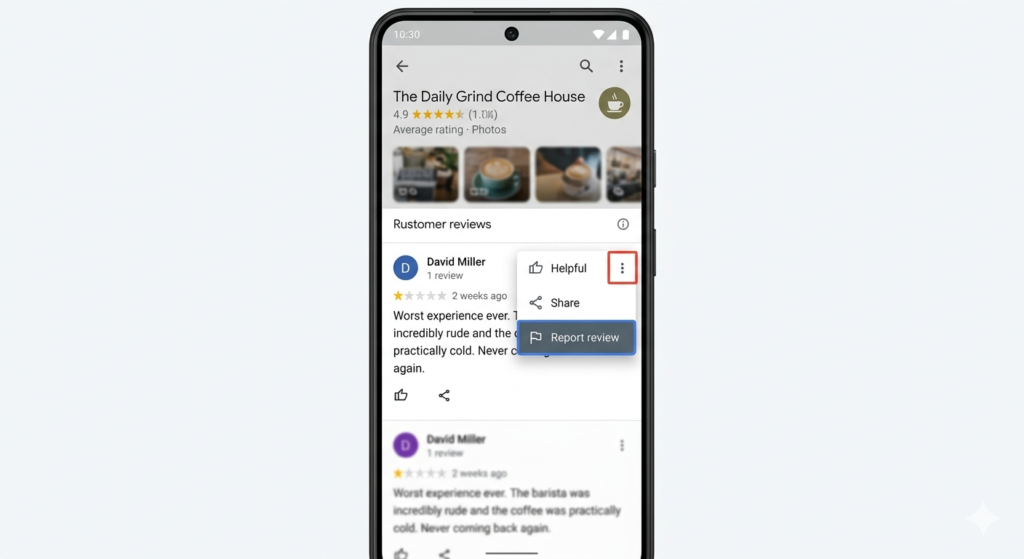
To report competitor fake reviews on Google, open the review on your Google Business Profile, click the three-dot menu beside it, and select ‘Report review’. Choose the violation type, submit the report, and follow up via the Google Business Profile Help Community or Legal Removal Request if Google does not act within 7–10 business days.
What You Will Learn
- How to identify fake reviews left by competitors
- Step-by-step process to report a fake Google review
- What to do when Google does not remove the review
- How to protect your business from future fake review attacks
- Legal and platform-level escalation options available in 2026
Why Do Competitors Leave Fake Reviews?
- To lower your overall star rating and push customers towards their own business
- To reduce your visibility in the Google local 3-pack and Google Maps rankings
- To damage your brand reputation with potential customers researching your business
- To increase their own relative prominence by weakening your credibility
- Because fake review services are cheap and widely available, making it a low-effort attack
- To trigger Google’s automated spam filters and accidentally get your genuine reviews removed
Fake Google Reviews — At a Glance
| Google Policy | Fake reviews violate Google’s Prohibited and Restricted Content policy |
| Removal Timeline | 7–10 business days after reporting (can take longer) |
| Reporting Method | Flag via GBP dashboard, Help Community, or Legal Removal Request |
| Success Rate | Higher when multiple signals of inauthenticity are present |
| Escalation Option | Google Business Profile Help Community or legal notice |
| Prevention | Consistent review generation and monitoring tools |
How to Report Competitor Fake Reviews on Google — Step by Step
Step 1 — Identify the Fake Review
Check the reviewer’s Google profile. Fake reviewers typically have no profile photo, no other reviews, and created the account recently. Cross-check whether this person ever visited your business by checking your CRM, booking records, or customer list.
Step 2 — Flag the Review Directly on Google Maps
Open Google Maps and find your business listing. Locate the suspicious review. Click the three-dot menu (…) next to the review. Select ‘Report review’. Choose the most applicable violation category such as ‘Conflict of interest’ or ‘Off topic’. Submit your report.
Step 3 — Report via Your Google Business Profile Dashboard
Log in to your Google Business Profile at business.google.com. Navigate to ‘Reviews’. Find the fake review and click the flag icon. Select the violation type and submit. This is the most direct reporting channel with the highest success rate.
Step 4 — Escalate via the GBP Help Community
If Google does not act within 7–10 business days, post your case in the Google Business Profile Help Community at support.google.com/business/community. Include evidence such as screenshots, profile age, review patterns, and your reporting history. Verified Top Contributors in the community can escalate to Google staff.
Step 5 — Submit a Legal Removal Request if Defamatory
If the fake review contains false statements of fact that defame your business, you may submit a Legal Removal Request via Google’s legal support portal. This is recommended only when the review contains clearly false, damaging claims that qualify under defamation law.
What Happens If You Ignore Fake Competitor Reviews?
- Your overall star rating drops, reducing click-through rates from search results
- Google Maps ranking can decline as review signals weaken your prominence score
- Potential customers lose trust and choose competitors over your business
- More fake reviews may follow as competitors realise there is no pushback
- Genuine customer reviews are harder to recover from once star rating falls below 4.0
Common Mistakes to Avoid When Reporting Fake Reviews
| Responding aggressively to the fake review | Makes your business look unprofessional and draws attention to the review | Respond calmly or not at all while the report is under review |
| Reporting with no evidence | Google’s system needs strong signals to act | Gather profile screenshots, review history, and timing data before reporting |
| Reporting only once and giving up | Google sometimes dismisses the first report | Escalate to the Help Community with documented evidence if the review remains |
| Asking friends to flag the review | Mass flagging without cause can backfire | Only report through official channels — GBP dashboard and Help Community |
| Ignoring the review pattern | One fake review can be part of a coordinated attack | Monitor your reviews regularly and report multiple suspicious reviews together |
Expert Tips to Handle Fake Google Reviews in 2026
- Set up Google Business Profile review alerts so you are notified immediately when a new review is posted
- Maintain a review generation strategy — a high volume of genuine 5-star reviews dilutes the impact of one fake review
- Document all suspicious reviews with screenshots and timestamps before reporting, as Google may not always make the review visible later
- Use tools like BrightLocal or Whitespark to monitor your review profile and detect unusual activity patterns
- Build your case before escalating — reviewers with no history, no photos, and accounts created the same day as the review are strong signals for Google
Frequently Asked Questions
Can Google actually remove fake reviews from a competitor?
Yes. Google can remove reviews that violate its content policies, including fake reviews, conflict of interest reviews, and reviews from non-customers. However, removal is not guaranteed and requires clear evidence of a policy violation. Reporting through the GBP dashboard and escalating via the Help Community improves the chances of removal.
How long does it take for Google to remove a fake review?
Google typically reviews flagged content within 7–10 business days. In some cases it may take longer, especially if the report requires manual review. If no action is taken, escalate through the Google Business Profile Help Community where Top Contributors can push the case to Google’s internal team.
What if Google does not remove the fake review after I report it?
If Google does not act, escalate by posting in the GBP Help Community with full evidence — screenshots of the reviewer profile, the review text, and your report history. If the review contains false and defamatory statements, consider submitting a Legal Removal Request through Google’s legal support portal as a final escalation step.
Can I sue a competitor for leaving fake Google reviews?
In some jurisdictions, leaving fake reviews that cause measurable business harm may qualify as defamation or unfair competition. Consult a legal professional if you have strong evidence linking a competitor to the fake review. This is a last resort and is separate from Google’s own removal process.
How do I prevent competitors from leaving fake reviews in the future?
Build a consistent review generation strategy to maintain a high volume of genuine reviews, making individual fake reviews less impactful. Monitor your profile weekly using review alert tools. Report suspicious reviews immediately. A strong, active review presence is the most effective long-term defence against fake review attacks.
Key Takeaways
- Fake competitor reviews on Google violate Google’s policies and can be reported via your GBP dashboard or Google Maps
- Always collect evidence — reviewer profile screenshots, account age, and review timing — before submitting your report
- Escalate to the GBP Help Community if Google does not act within 7–10 business days
- The best long-term defence is a proactive review generation strategy that consistently builds genuine 5-star reviews
- Legal escalation is available for clearly defamatory content if platform-level reporting fails